Procurement Integration in Mewayz
The Procurement Add-On helps organizations manage the entire Procurement process from creating RFxs (Request for Information, Quotation, Proposal) to handling Applications, Scheduling Interviews, and Onboarding Vendors.
Introduction
The Procurement Add-On helps organizations manage the entire Procurement process from creating RFxs (Request for Information, Quotation, Proposal) to handling Applications, Scheduling Interviews, and Onboarding Vendors. It allows users to publish RFxs, track Applications, Schedule Interviews, and Convert successful Applicants into Vendors efficiently. The system connects multiple sections such as Dashboard, Manage RFx, Manage RFx Application, Manage RFx Applicant, Manage Archive RFx Application, Manage Vendor On-Boarding, and Manage Vendor to provide a complete Procurement workflow.
How To Install the Procurement Add-On?
To Set Up the Procurement Add-On, you can follow this link: Setup Add-On.
How to Use the Procurement Add-On?
Company & HR Dashboard
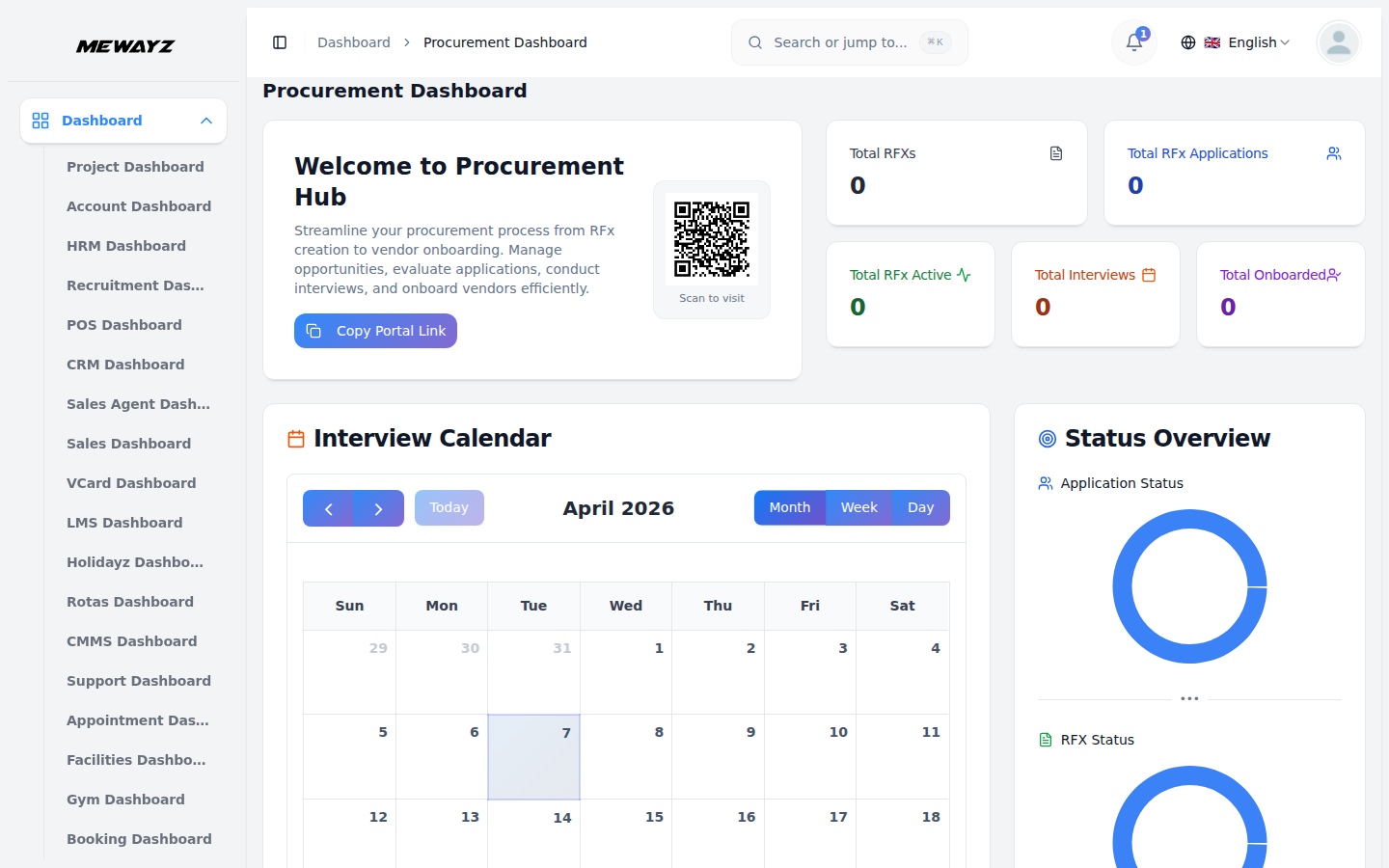
- The Procurement Management Dashboard provides administrators with a comprehensive overview of their organization’s procurement operations. This centralized hub allows you to monitor all aspects of your procurement process without navigating between multiple screens.
- The dashboard includes a Copy Portal Link button to quickly copy the vendor portal URL and a View Portal button to preview the vendor portal in a new tab. Key metrics are displayed at the top, including total RFXs, Total RFx Applications, Total RFx Active, Total Interviews, and Total Onboarded, giving instant insight into procurement activity.
- A visual calendar shows all scheduled interviews with month, week, and day views, allowing users to easily track appointments and view interview details with color-coded status indicators for scheduled, completed, and cancelled interviews. Donut charts summarize the status of applications (Applied, Phone Screen, Interview, Hired, Rejected) and RFXs (Active, Closed, Draft) for quick progress tracking with interactive click-to-filter functionality.
- A funnel chart displays the full procurement journey from RFX creation, applications, interviews, to vendor onboarding, helping identify process strengths and gaps with conversion rates and drop-off analysis. The Urgent Tasks section highlights pending or rescheduled interviews with Review buttons to directly open related pages, new RFx publications, completed interviews, and successful vendor onboardings. The Welcome Card provides customizable welcome messages and portal sharing functionality with QR code generation for mobile access.
Staff Dashboard
- The Staff Dashboard is designed for procurement team members to track their assigned responsibilities and contributions. This focused interface displays information relevant to your specific role in the procurement process with limited permissions based on staff role.
- The summary cards display your personal statistics including interviews you’ve been assigned to conduct, applications you’re reviewing, and procurement activities under your management. This helps you track your workload and contributions to the organization’s procurement goals with personal productivity metrics.
- The My Interviews section shows your assigned interview schedule with applicant details, RFx information, and interview status with direct access to interview management functions. The calendar view focuses on your personal schedule, showing only interviews where you’re the assigned interviewer with status update capabilities.
Manage RFx
- To create a new RFx, click the “Create” button at the top of the page. Fill in the RFx Title, select the Start Date and End Date, and choose the Status from the dropdown (Active or Inactive). Select Category from the Category dropdown, which comes from RFx Category in System Setup. Next, select Location from the Location dropdown, which comes from RFx Location in System Setup. Select Contract Types from the Contract Types dropdown, which comes from RFx Contract Types in System Setup. Choose the RFx Type, and enter the required Skills. You may add multiple skills. Then enter the Position, Budget From, and Budget To. You can also select Custom Questions, which are pulled from the Custom Questions module in System Setup. Finally, enter the Description, Requirements, and Terms & Conditions, and choose whether to display the Terms & Conditions on the application form. You may also mark the RFx as Featured.
- In the Purchase Details section, select the Billing Type. You can choose Item, which allows you to add multiple items using the repeater, or choose RFX, which allows you to add multiple RFx items using the repeater. All items are fetched from the base items, ensuring consistency and accuracy in item selection across the system.
- The RFx listing table displays important information, including Code, Title, Category Name, Location Name, Contract Type, End Date, RFx Type, Status, and Featured. You can manage each RFx using the actions provided in the table.
- In the Actions column, Clicking the View button displays the RFx details, including options to edit the record. The Edit button lets you modify the existing RFx, while the Delete button allows you to remove it from the system.
- All Active RFx entries are displayed on the frontend site. Users can click the “View Details” button to see the complete RFx requirements and descriptions. To apply for an RFx, users can click the “Apply Now” button. All submitted application data will be visible under the “Applied” stage in the RFx Application section.
Manage RFx Applicant
- To add a new applicant, click the “Create” button. At the top of the RFx Applicant page. Enter Name, Email, Phone, Date of Birth, select Gender, enter Country, City, State, and Profile Document and Proposal Document.
- The list page shows all RFx Applicants with columns displaying Profile, Name, Email, Phone, Gender and Country. You can use the Search and Filters buttons to find Applicants information.
- In the Actions column, click on the “View” button you can see the Applicant Details,click on the “Edit” button you can modify the existing applicant record. click on the “Delete” button and you can remove the applicant record.
Manage Rfx Applications
- To create a new RFx Application, click the “Create” button and select the RFx from the dropdown. Choose the Application Type—either New or RFx Applicant. If you select New, you must manually enter all applicant details such as Name, Email, Phone Number, Date of Birth, Gender, Country, City, State, Profile Document, and Proposal Document. If you select RFx Applicant, the form will automatically populate with the applicant’s saved information, making the process faster and more accurate. After that, enter the Cover Letter, select the Bid Type (Competitive or Non-Competitive), enter the Bid Total, and provide answers to all Application Questions. Once all details are completed, click the “Create” button to add the application to the list.
- The list page displays all RFX Applications with columns such as Tracking ID, Profile, Name, Email, Phone, RFX Title, Rating, and Application Type. You can use the Search and Filter options to quickly locate specific application records.
- In the Actions column, clicking the “Archive” button will move the selected application to the Archive RFX Applications section. Clicking the “Unarchive” button will restore the application back to the main RFX Applications list. This helps manage active and archived applications efficiently.
- When you click the “View” button, you will be redirected to the View RFX Application page. This page displays complete applicant details, including Name, Email, Phone Number, Date of Birth, Gender, and Address under Personal Information. Under RFX Information, you can view the RFX Title, Application Type, Stage, Bid Type, Billing Type, Bid Total, Application Date, and Rating. You can also update the Rating and edit the Skills if needed. Additionally, the page includes the Applicant Notes section, where you can add, edit, or delete notes, as well as the Cover Letter and Attachments sections, where you can view and delete uploaded files.
- To modify an existing application, click the “Edit” button in the Actions column. To remove an application entirely, click the “Delete” button.
- In the Kanban View, you can click the “Kanban View” button to display all applications as cards organized under their respective stages. This view allows you to drag and drop the cards between stages to easily update the application status.
- Each application card displays key details such as the applicant’s image, name, rating, title, and created date, making it easy to identify and manage applications at a glance.
- The number of applications in each stage is shown next to the stage name, helping you quickly understand the workload and progress in every stage.
- You can also apply for an RFx opportunity directly from the frontend homepage. Multiple RFx opportunities are listed under the Available Opportunities section. Click the “Apply Now” button on any opportunity to open the Apply for Opportunity page. This page displays the Opportunity Summary along with the application form.
- In the application form, enter your Personal Information, including Name, Email Address, Phone Number, Date of Birth, and Gender. Select the Bid Type (Competitive or Non-Competitive), and enter the Bid Amount, Country, State, and City. Upload the required documents such as your Profile and Proposal. Next, answer the Application Questions provided for the RFx.
- Below this section, you will see the Billing Information, which includes the Billing Type and an Items table showing Item Name, Unit Price, Quantity, Discount (%), Tax (%), and Item Total. The total Bid Amount is also displayed. You can click the “Edit” button to modify the Billing Information if needed.
- After completing all fields, click the “Submit Your Application” button to save and submit the application.
- You can track the status of your submitted application by clicking the “Track Application” button at the top of the page. This opens the Check Your Proposal Status page. Enter your Tracking ID and Email Address, then click the “Track Proposal” button to view your proposal details and current status.
Archive RFx Applications
- The Archive RFX Applications page allows you to manage all applications that have been archived. When an application is archived, its details appear on this page for review and management.
- The listing page displays all archived RFX applications with key details such as Tracking ID, Profile, Name, Email, Phone, Application Type, RFX Title, and Rating. You can also use the Search and Filter options to quickly find specific archived application records.
- In the Actions column, clicking on “Unarchive” will restore the record. Once unarchived, the application is removed from the Archive RFX Applications page and becomes visible again on the main RFX Applications page. Additionally, clicking on the “View” button allows you to see the complete details of the archived RFX application.
Manage Interview Schedules
- To schedule interviews, click the “Create” button. at the top of the interview schedules page. Selecting the Application from the dropdown is fetched from the RFX Application Module. Selecting the Interviewer from the dropdown is fetched from the Users Module. Select the date and time, and enter the Comment.
- Once all details are completed, click the “Create” button for the interview schedule.
- The list page displays all interview schedules with columns such as Application Name, Interviewer, Date, Time, and Status dropdown (Scheduled, Completed, Cancelled) managed. You can also use the Search and Filter options to quickly find specific interview schedule records.
- In the Actions column, click on the “View” button and you can see the Interview Schedule Details. Click on the “Edit” button and you can modify the Interview Schedule record details. And click on the “Delete” button you can remove the Interview Schedule record.
- When you click the “Calendar View” button, you will be taken to the Interview Calendar page. The calendar displays each interview on its scheduled date, allowing you to clearly view all upcoming interviews. Below the calendar, you can also see a detailed list of all interview schedules. If you need to remove an interview, simply click the Delete button to delete the schedule.`
- You can track the status of your submitted application from the frontend by clicking the “Track Application” button at the top of the page. This opens the Check Your Proposal Status page, where you can enter your Tracking ID and Email Address. After clicking the “Track Proposal” button, you can view all proposal details, including the current status and interview schedule information. This feature allows you to easily monitor the progress of your application at any time.
Manage Vendor On-Boardings
- To create vendor onboarding, click the “Create” button. at the top of the vendor on boardings page. Selecting the Application from the dropdown is fetched from the RFX Application Module, Select the Joining Date, Days Of Week, Budget, Select the Budget Type from the dropdown is fetch from system setup Budget Types module, Select the Budget Duration from the dropdown (Monthly or Weekly), select the Rfx Type from the dropdown (RFI, RFQ, RFP) and Select the status from the dropdown (Pending. Cancel, Confirm).
- Once all details are completed, click the “Create” button for the vendor on boarding.
- The list page displays all vendors on boarding with columns such as Name, Email, Phone, Joining Date, Budget, Rfx Type, Status and Budget Duration. You can also use the Search and Filter options to quickly find specific vendors on boarding records.
- Click Convert to Vendor in the action column when status is confirmed to convert the applicant into a vendor – data will only be visible in the vendor list after conversion. Click the Edit button in the action column to modify vendor onboarding details. Click the Delete button in the action column to remove the record.
RFx Vendors
- When the vendor on boardings in the action column clicks on the “Convert to Vendor” button and that record converts into a vendor and that vendor details are added in this RFX Vendors page list.
- The list page displays all RFX Vendors with columns such as User, Vendor Code, Company Name, Contact Person, Email and Tax Number.
System Setup
Manage RFx Category
- To add a new category, click the “Create” button at the top of the page and enter the Category Name which will be displayed as a dropdown option when creating RFxs. Once the category name is filled in, click the Create button to save the category.
- The list page displays all category records in a table with columns for Category Name and Actions. From the action column, you can Edit a category to update its name or Delete a category when it is no longer needed.
Manage RFx Stage
- To add a new stage, click the “Create” button at the top of the page and enter the Stage Title which will be displayed in the Interview Schedule Calendar View, RFx Application List, and Kanban Grid Views. Once the stage title is filled in, click the Create button to save the stage.
- The list page displays all stage records in a table with columns for Name and Actions. From the action column, you can Edit a stage to update its title or Delete a stage when it is no longer needed. These stages are crucial for application workflow management and provide visual tracking in the Kanban view where applications can be moved between stages using drag-and-drop functionality.
Manage Budget Type
- To add a new budget type, click the “Create” button at the top of the page and enter the Budget Type Name which will be available as a selection option when creating vendor onboarding records. Once the budget type name is filled in, click the Create button to save the budget type.
- The list page displays all budget type records in a table with columns for Budget Type Name and Actions. From the action column, you can Edit a budget type to update its name or Delete a budget type when it is no longer needed. These budget types help categorize and manage different financial arrangements with vendors during the onboarding process.
RFx Locations
- To add a new location, click the “Create” button at the top of the page and enter the Location Name which will be displayed as a dropdown option during RFx creation and used for location-based filtering. Once the location name is filled in, click the Create button to save the location.
- The list page displays all location records in a table with columns for RFx Locations and Actions. From the action column, you can Edit a location to update its name or Delete a location when it is no longer needed.
RFx Contract Types
- To add a new contract type, click the “Create” button at the top of the page and enter the Contract Type Name which will be displayed as a dropdown option during RFx creation and used for contract-based classification. Once the contract type name is filled in, click the Create button to save the contract type.
- The list page displays all contract type records in a table with columns for RFx Contract Types and Actions. From the action column, you can Edit a contract type to update its name or Delete a contract type when it is no longer needed.
Custom Questions
- To add a new custom question, click the “Create” button at the top of the page and enter the Question Text, select the Question Type from available options, toggle the Required Field setting to make the question mandatory or optional, and set the Active Status to control question availability. Once all question details are configured, click the Create button to save the custom question.
- The list page displays all custom question records in a table with columns for Question Text, Question Type, Required Status (displayed as Yes/No), and Actions. From the action column, you can Edit a custom question to update its configuration or Delete a custom question when it is no longer needed.
Brand Settings
- In the Brand Settings section, you can configure your basic website identity elements. Enter your Title Text, Footer Text, to establish your brand presence. Upload your Site Logo, and Favicon to ensure consistent branding across your website.
- Below you can manage the Mewayzboard Welcome Card Settings section allows you to customize the welcome card displayed on the dashboard. In this section, you can enter the Card Title, Card Description, Button Text, and Button Icon to control how the welcome message appears to users. After filling in all the required details, click the Save Changes button to store the settings.
- Once saved, these details will automatically appear on the Mewayzboard page, ensuring the welcome card reflects the updated content and provides users with clear guidance and quick access to the frontend website or key actions.
About the Organization
- In the About the Organization section, enter details such as Our Mission, Organization Size, and Industry to enhance the company’s profile and visual appeal. On the frontend homepage, the Available Opportunities section displays all active opportunities. When a user clicks the “View Details” button on any opportunity, they are redirected to the opportunity details page. On this page, the About the Company section shows all the organization information you have added.
Need Help?
- In the Need Help section, enter details such as the Description, Email, and Phone Number to provide clear support information and improve the visual appeal. On the frontend, these details appear on the Application Tracking Details page, where users can easily view the Need Help? section for assistance.
Proposal Tips Section
- In the Proposal Tips section, enter each Proposal Tip, and click the Add Tip button to include multiple tips for better guidance and improved visual appeal. On the frontend, these tips are displayed on the Apply for Opportunity page under the Proposal Tips section, helping applicants submit stronger and more effective proposals.
What Happens Next Section
- In the What Happens Next section, enter the details for each step, including the Step Title, Icon, and Description. Click the Add Step button to add multiple steps, providing clearer guidance and an enhanced visual experience. On the frontend, these steps appear on the success page after an application is submitted, allowing applicants to clearly understand what will happen next in the process.
FAQ
- In the FAQ section, enter the Question and Answer, then click the Add FAQ button to add multiple FAQ items for better guidance and improved visual appeal. On the frontend, these FAQs appear on the Check Your Proposal Status page, where users can view all the Frequently Asked Questions listed below the proposal tracking details.