Fast2SMS Add-On Integration in Mewayz
The Fast2SMS Add-On is a powerful messaging solution that enables businesses to send instant and reliable SMS notifications.
Introduction
The Fast2SMS Add-On is a powerful messaging solution that enables businesses to send instant and reliable SMS notifications. Designed for seamless communication, this Add-On ensures timely updates for customers and team members, enhancing engagement and operational efficiency. Whether it’s transactional alerts, appointment reminders, promotional messages, or verification codes, Fast2SMS provides a fast and cost-effective way to reach users. With easy integration and high deliverability, businesses can streamline their communication processes while maintaining full control over their messaging needs.
How To Install The Fast2SMS Add-On?
To set up the Fast2SMS Add-On, follow this link: Setup Fast2SMS Add-On.
Note: You need to add your phone number while creating the user to have access to the Fast2SMS Add-On.
How To Use The Fast2SMS Add-On?
- Once you purchase the Add-On, navigate to the settings page, click on system settings, and
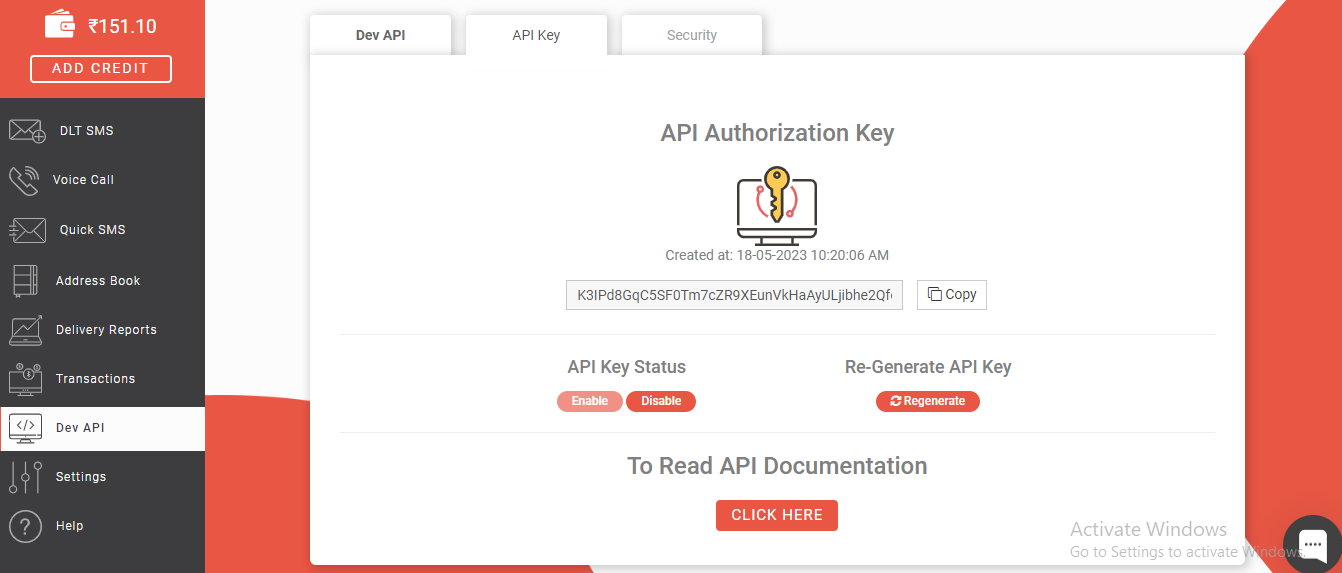
- On that page, you have to enter the Fast2SMS API Key, with the help of which you can send
- You will need to create an account in Fast2SMS before you generate the API Key. Once you
- To generate the API key, you can follow this link: Documentation Link
- After you do this, you get a chance to choose the notification settings. Here is the way you
- You can customize notification messages language-wise. For example, if you want to change
- For example, if you enable the create user setting from General, then the notification
find Fast2SMS.
messages via Fast2SMS.
create an account, you can easily generate the API Key.
can enable or disable the notifications of the various Add-Ons.
the message for new user notifications, you can do it here.
via Zita SMS will be sent to that particular user when the user is created.
### General
- New User
- New Sales Invoice
- Sales Invoice Status Updated
- New Sales Proposal
- Proposal Status Updated
- New Purchase
- New Warehouse
### Accounting
- New Customer
- New Revenue
- New Vendor
### Appointment
- New Appointment
- Appointment Status
### CMMS
- Work Order Request
- New Supplier
- New POs
- Work Order Assigned
- New Component
- New Location
- New Pms
### Contract
- New Contract
### HRM
- New Monthly Payslip
- New Award
- New Event
- Leave Approve/Reject
- New Announcement
- New Holidays
### CRM
- New Lead
- Lead to Deal Conversion
- New Deal
- Lead Moved
- Deal Moved
### Sales
- New Quote
- New Sales Order
- Meeting Assigned
### Recruitment
- New Candidate
- Interview Schedule
- Convert To Employee
- New Job Posting
### Project
- New Project
- New Task
- New Bug
- New Milestone
- Task Stage Updated
- New Task Comment
### Zoom Meeting
- New Zoom Meeting
### Fix Equipment
- New Accessories
- New Asset
- New Audit
- New Fix Equipment Component
- New Consumables
- New Licence
- New Fix Equipment Location
- New Maintenance
### Visitor Management
- New Visitor
- New Visit Purposes
### WordPress Woocommerce
- New Product
### Feedback
- New Template
- New Feedback Rating
### School / Institute Management
- New Teacher
- New Admissions
- New Parents
- New Students
- New Homework
- New Time Table
### Cleaning Management
- New Cleaning Team
- New Cleaning Booking
- New Cleaning Invoice
### Machine Repair Management
- New Machine
- New Repair Request
### Hospital Management
- New Doctor
- New Patient
- New Hospital Appointment
- New Hospital Medicine
### Timesheet
- New Timesheet
### Notes
- New Note
### Internal Knowledge
- New Article
- New Book
### Innovation Center
- New Creativity
- New Challenge
- New Category
### ToDo
- New To Do
- Complete To Do
### Documents
- New Document
So, this is how you can use the Fast2SMS Add-On very easily.